
 About Dan Wilson
 Contact Me
 Dan Wilson
 Dan Wilson
 Model-Glue:Gesture for Fun and Profit
 Watch Video
 Presentation Files
 DataCurl LLC, My Company
 2010 Speaking Engagements
 Video Interviews
 DZone Articles

How to fix path is not a working copy directory and working copy is already locked errors
 Posted By : Dan Wilson
 September 2, 2010 9:11 AM
A few days ago I was writing some code to generate reports. After the reports were generated, the reports were emailed, then deleted off the server. I made a mistake and deleted the contents of the directory.
This was a bad thing because all of the .svn files were also deleted. I tried to replace the directory contents with the latest from SVN and I got an error. I tried to update my working copy and got an error. No matter how I interacted with SVN, I got one of the following errors:
- Path is not a working copy directory
- Working copy is already locked
- Working copy '[directory]' is missing or not locked
To fix this:
I manually removed the directory entirely from my local copy. Then I updated to HEAD from SVN. This created the directory I accidentally deleted, put the files back and also added in the .svn files that were missing (and causing the working copy errors)
Apparently, if the directory exists, and SVN doesn't find the .svn files it is looking for, it gets confused. Removing the directory is enough for it to recreate it. (Since the missing directory was tracked in the parent directory .svn files)
Hope this helps you out!


How to resolve svn: Error setting property 'log':
Posted By : Dan Wilson
September 29, 2009 7:31 AM
I was trying to check in some changes on the Model-Glue framework and kept getting this error:
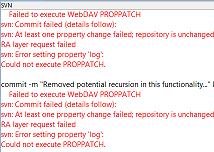
2 At revision 184.
3commit -m "Removed potential recursion in this functionality..." D:/webroot/ModelGlueTrunk/ModelGlue/gesture/helper/HelperInjector.cfc D:/webroot/ModelGlueTrunk/ModelGlue/gesture/helper/IncludeHelperShell.cfc
4 Failed to execute WebDAV PROPPATCH
5svn: Commit failed (details follow):
6svn: At least one property change failed; repository is unchanged
7RA layer request failed
8svn: Error setting property 'log':
9Could not execute PROPPATCH.
I updated from SVN, thinking it to be a synchronization error, but I still got the same error.
I used the 'cleanup' or SVN:clean functionality to maybe get the .svn files and such back in to the right condition, but that didn't help either.
The original SVN Comment I used was:
2Also removed useless cfdump when a helper is attempted to be included but doesn't have a cfc or cfm extension
Can you spot the issue? I can't either. What fixed the error:
2svn: Commit failed (details follow):
3svn: At least one property change failed; repository is unchanged
4RA layer request failed
5svn: Error setting property 'log':
6Could not execute PROPPATCH.
Was changing the multi-line comment to a single line comment. Once the comment was a single line, there was no issue checking it in. I'm not sure what I learned here, but I hope SVN doesn't REALLY have a problem with multi-line comments, after all, we need those to keep details on what changed!
Adding Subclipse to Flex Builder 3 Standalone
Posted By : Dan Wilson
October 8, 2007 9:18 AM
When I tried to install Subclipse into Flex Builder 3 beta Standalone version, I got an error claiming org.eclipse.jdt.core was missing. A recent post by Joao Fernandes pointed me in the right direction. In my case, I needed to update the Java Development Tools and the Plugin Development Environment.
To perform the updates:
My Travels with Apache, Subversion and Windows XP Pro 64bit
Posted By : Dan Wilson
September 29, 2006 7:41 PM
A few days I completed an installation of Subversion on Windows XP Pro 64. Subversion usually a pretty easy set up. In this case I was setting up subversion on an XP Pro 64 bit OS and there was an annoying wrinkle to the process.
I didn't know much about 64 bit windows, just that it could supposedly run 32 bit applications with no problem. (You know backward compatibility and all that bollocks). At this point, I wasn't much worried about incompatibilities, seemed like a piece of cake.
 Suscribe
 Follow Us
 Contact