
 About Dan Wilson
 Contact Me
 Dan Wilson
 Dan Wilson
 Model-Glue:Gesture for Fun and Profit
 Watch Video
 Presentation Files
 DataCurl LLC, My Company
 2010 Speaking Engagements
 Video Interviews
 DZone Articles

Tips for Google Ads Keyword Matching
 Posted By : Dan Wilson
 April 14, 2020 1:18 PM
Running Digital Ads is a lot of fun. Many times, it’s instant feedback. If something is working you get clear results in your metrics and reporting (Right?). If something isn’t working you either see the absence of metrics or just get an “overwhelming sense of quiet” where there shouldn’t be. I sometimes get that same overwhelming sense of quiet when my two boys are playing alone.
Google Ads offers ad placement based on keywords. It’s important to know which style of keyword match is most appropriate. Editor’s Note: Insert standard disclaimer that “Google is always changing stuff so it might be different by the time you read this article.”
The success of your keyword targeting campaign is directly tied to how well you chose your keywords. Do they match how the user is searching for your product? You might be surprised how different your perception is, from the actual queries. Many of us have our own “language” for searching google and it doesn’t at all line up with how we speak or write plain English.
Google Ad Tip for Getting Best Keywords
When setting up a new google ad campaign, I’ll set up at least 2 ad groups. One contains the keywords I feel are the best match. I usually make these tight by using phrase match or exact match. Call this group the “Money Group”.
The other Ad Group has the same keywords but in broad match. Call this the “Expeditionary Group”. Since I have less control over where these keywords match, I’ll bid lower for these.
I run the two Ad groups at the same time, looking to harvest good ideas from the “Expeditionary Group” and promote them to the “Money Group”. Also, I’m looking for negative keywords I can add to exclusion lists. Without fail, I find interesting things all the time.
Google Ads Keyword Harvesting for Improved Results
Our company, Digital Primates, has expertise in Apache Flex. This technology was popular several years ago for writing interactive applications. The underlying technology for Flex apps will be discontinued this year. As such, we have campaigns going on to find companies who need Flex App Migration help.
The Money Group had very few keywords. Here’s an example good keyword for us:
- Apache Flex Application
The Expeditionary List had much broader matching and keywords. Here are some of the words it found that got moved to the Money List.
- flex flash
- adobe flex to adobe air app front end
- apache flex sdk
There were also some duds, or cases where there exists conceptual overlap with Flex. Here’s an example of those.
- flextime app
- https dash iflex app
- apps for ford flex
- flextime facetime app
- zizo flex watch app
- flexpay app
- kapuskasing flex program
- onyx kids flex app
- flex a bus app
- applynowchase com flexapp
- amazon flex application
By monitoring the Expeditionary List for a few days, I was able to pull out a fair number of keywords that made sense for our campaign, and then shut down the Expeditionary List. Think of this as planting random seeds and keeping the good stuff. As a reminder, here are the match types for Google Ads. Use Broad match for your expeditionary list and tighter matching styles (Phrase, Exact) for your higher value keywords.
Keyword match type summaries
|
Match type |
Special symbol |
Example keyword |
Ads may show on searches that contain: |
Example searches |
|
Broad match |
none |
women's hats |
Close variations of the keyword, related searches, and other relevant variations. The words in the keyword don’t have to be present in a user’s search. |
|
|
Broad match modifier |
+keyword |
+women’s +hats |
All the terms designated with a + sign (or close variations of those terms) in any order. Close variations include terms with the same meaning. Additional words may appear before, after, or between the terms. |
|
|
Phrase match |
“keyword” |
“women’s hats” |
Matches of the phrase (or close variations of the phrase) with additional words before or after. Close variations include terms with the same meaning. |
|
|
Exact match |
[keyword] |
[women’s hats] |
Exact matches of the term or close variations of that exact term with the same meaning. |
|


What is a Partner – Part 1
Posted By : Dan Wilson
October 23, 2017 7:17 AM
If you remember, I spent 17 years building software, running a startup, and also running a consultancy. Imagine my surprise when I entered the corporate world after a 12-year hiatus.
Apparently, the industry has redefined what the word "Partner" means. Due to my role, I get many emails, offers to connect on Linked In, and other unsolicited communications to "Partner" with another company. Their definition of Partner is for me to get out my checkbook and pay them to do something.
I know I'm not one of the "cool kids" any longer. I'm middle-aged, a parent and I've got a couple of grey hairs. (Queue Grandpa Simpson Voice) However, back in my day that used to be called a Vendor relationship. A partner used to imply something a bit more meaningful.
If you "contact" me with a desire to "partner", please be upfront of how we are partnering. Your proposal should be a bit more meaningful than asking for check for a product or service. If we entered that sort of relationship, I am your customer or client, not your "partner".
DirectTV Fraud 888-407-2674
Posted By : Dan Wilson
October 19, 2016 10:36 AM
I've been contacted by a company claiming to be from Direct TV. They claim I can take advantage of a promotion with Amazon to pay 5 months of my bill with an Amazon Gift Card. If I do that, I'll get 2 years at a very reduced rate.
I've been stringing these guys along for a few days now, just to see how this works and how I can report it. Since I am not sure how best to shut this down, I'm putting the information on this website. Hopefully it shows up when you google the number or something else. No reputable company would ask you to do this. Further, always google the company and call the phone numbers listed on their site, not some weird number you get from a weird guy on the phone.
- Company Caller ID: Mas Tec
- Originating Number: 800-531-5000
- Promotion Code: CXDTV6266
- Number to Call: 888-407-2674
- Identifying characteristics of caller: Indian accents
So if you end up on this web page, and suspect this is happening to you, it's fraud and you should not buy any gift cards. I would expect as this scam evolves, the gift card vendor will change from Amazon.... in short, Gift cards are the same as cash, so never pay weird bills over the phone with them.
If you need the billing phone number for Direct TV, call: 1 (800) 531-5000 and get through the phone tree for billing (Ask for representative).
This is not a knock on Indian people, nor on Direct TV. Both are awesome.
Why is my connection to Google, Gmail or HSTS Site Untrusted?
Posted By : Dan Wilson
February 14, 2016 10:20 AM
Connection to Google untrusted? Fix below!
Lately, I have had issues connecting to Google, Google Mail and other random services over the last few months. I did some digging today and fixed (I believe) the issue. If you are having problems with security messages like the below, try these steps to see if it fixes the problem. I'll put some narrative/background info below if you are curious as to my findings.
Here's an example of what I would see if I dug into the Untrusted Message:
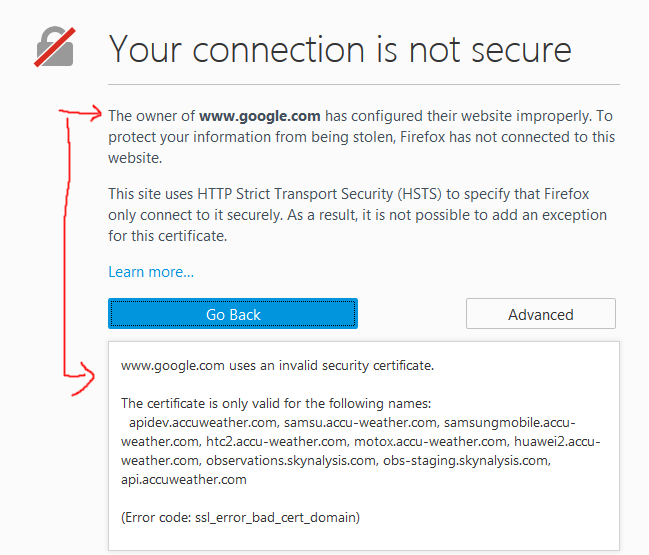
How in the world is accuweather the actual cert for google?
Solution: Here's what I did.
In short, you need to remove the offending certificates. Your browser will re-ask for them and get the right ones
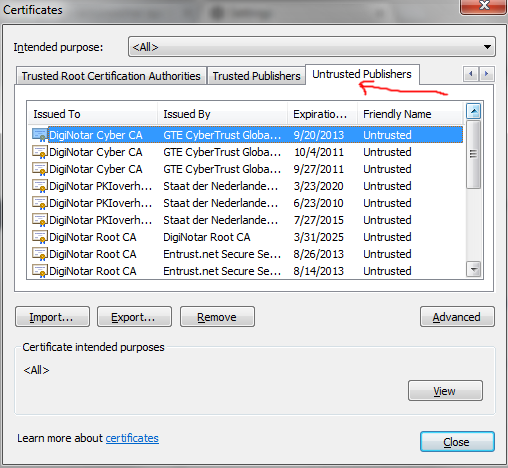
Google Chrome: (screen shots below)
- Click on the 3 horizontal lined Hamburger menu
- Click on Advanced Settings
- Click on HTTPS/SSL Manage Certificates
- Click on Untrusted Certificates Tab
- Remove all that said Fraudulent
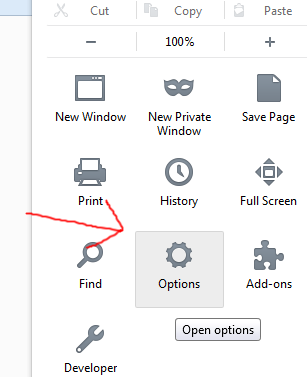
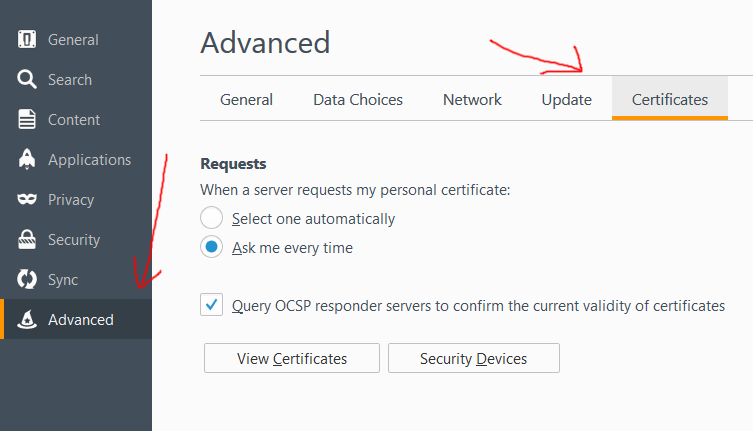
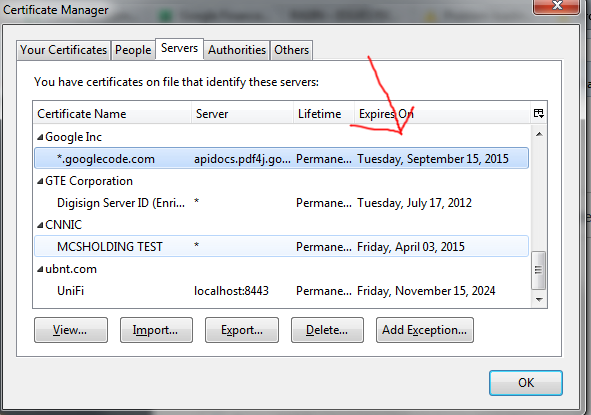
Mozilla Firefox (screen shots below)
- Click on the 3 horizontal lined Hamburger menu
- Click on the Options button
- Click on the Advanced Menu on the right
- Click on the Certificates Tab
- Click on the View Certificates Button
- Click on the Servers Tab and remove the expired certificates
Google Chrome Screenshots
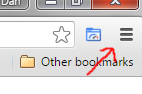
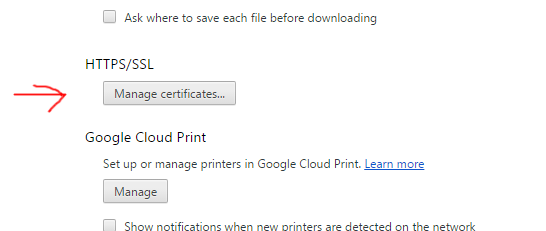
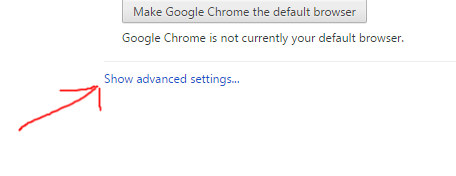
Mozilla Firefox Screenshots

Ok, so what is this all about?
From my research, certain sites using HSTS (HTTP Strict Transport Security) are throwing security alerts upon connection to pages on the domain. In March 2011 an HTTPS/TLS Certificate Authority (CA) was tricked into issuing fraudulent certificates. Patches to the major web browsers blacklisted a number of TLS certificates that were issued after hackers broke into the Certificate Authority. These were high value certs and likely state sponsored cyber-attacks from Iran. Below is the list of domains affected:
- mail.google.com
- www.google.com
- login.yahoo.com
- login.skype.com
- addons.mozilla.org
- login.live.com
- global trustee
The weird thing about this, is my computer wasn't even manufactured in 2011. I purchased it in 2013! There must have been a recent update to either the servers matching the domains above, or to my browsers or operating system a few months ago. Regardless, connecting to the domains in the above list has been problematic with random security warnings and even blockages on my own computer.
Let me know if this fixed the problem for you!
Update: 11/21/2016
This problem has never really gone away. In fact, it drives me nuts! I did find some other things to do to help this go away.... try these steps if you are on windows:
- From the Control Panel, open network and sharing center
- On the left side- click on "Change advanced sharing settings"
- Click on home or work
- Check "turn off" for the first three questions.
Depending on the specifics you may also have to turn on password
NativeScript button event not firing
Posted By : Dan Wilson
November 25, 2015 4:41 PM
I spent a bit of time trying to understand why a tap event failed to fire on a button in NativeScript. Here was the original code segments:
Button Code
Tap Event Handler Function
2 var page = args.object;
3 console.log("paydebt");
4}
The intent of this code was to hide the Pay Debt button if there was no debt. In exports.payDebtAction(), there was a call to the view-model to reduce the debt by the appropriate amount. When I ran the code, I did not get any output in the console. Thus, the code to reduce the debt never ran and the button never disappeared from the view.
Using the Throw-Stuff-At-The-Wall method, I eventually removed the visibility attribute from the Button declaration, and handled hiding the button in the code behind file like this:
Tap Event Handler Function
2 var page = args.object;
3 console.log("paydebt");
4 GameViewModel.payDebt();
5 var debt = GameViewModel.get("debt");
6 if( debt < 1){
7 View.getViewById(page, "payDebtButton").visibility='collapse';
8 }
9};
Notice the id attribute on the button. I use that ID to get a reference to the control, then set the visibility property in javascript, not in the view XML. This code works as expected.
I'm not 100% sure what I learned, but perhaps if there is a way to sum it up, is to not try to do so much in the XML layer. The JS layer is a lot more powerful anyways.
Updating from NativeScript 1.4 to NativeScript 1.5
Posted By : Dan Wilson
November 24, 2015 2:05 PM
I ran into an issue updating NativeScript 1.4 to NativeScript 1.5. The symptom:
2> node postinstall.js
Basically, after uninstalling and reinstalling NativeScript on Windows 7 (maybe other OS's are affected also), the process would hang at the node postinstall.js. By hang, I mean it was stuck at the above status for 15 minutes. I looked at the source for postinstall.js and nothing specifically stood out to me as potentially the problem. Hat tip to Jen Looper for the suggestion to upgrade Node.js. Upgrading to the latest 4.x fixed the issue for me.
Why were you running an out of date Node.js DAN?
The NativeScript Getting Started Documentation stipulated Node .12 at the time. Since NativeScript has been released, they have updated the documentation to now include Node 4.x.
It is possible a fresh install might work on .12 or an older version of Node, however once I updated to the latest Node Binaries, the install for NativeScript 1.5 finished promptly. If you have issues upgrading to NativeScript 1.5, freshen up your Node.js version and that should take care of it.
Application Upgrade
Another thing I noticed, was a difference in the values in the root package.json for the value "tns-core-modules" was 1.4.0. I manually changed that value to 1.5.0 and the application built and deployed successfully. I'm not sure if you HAVE to do that, but I did it and saw no ill effect.
Before manually changing tns-core-modules
Before I manually changed the value of tns-core-modules, I ran npm install to ensure my dependencies were set correctly. Here is what happened:
2npm WARN package.json @ No description
3npm WARN package.json @ No repository field.
4npm WARN package.json @ No README data
5npm WARN package.json @ No license field.
After manually changing tns-core-modules
2npm WARN package.json @ No description
3npm WARN package.json @ No repository field.
4npm WARN package.json @ No README data
5npm WARN package.json @ No license field.
6tns-core-modules@1.5.0 node_modules\tns-core-modules
As you can see from the final line, the tns-core-modules for my specific project were updated to the 1.5.0 version.
The best way to develop and run NativeScript projects in an emulator
Posted By : Dan Wilson
November 24, 2015 9:52 AM
I develop NativeScript on Windows. As in most new, shiny technology, developing on Windows has it's quirks. In this post, we'll talk about 3 different ways to run your NativeScript project in an emulator, as well as the pros and cons of each method. I'm also going to use the Android platform. The iOS commands are the same, except for swapping iOS for the keyword android in the command.
All methods assume you have an emulator for your platform, with a device profile created. Additionally, at least on Android, it is necessary to start the device emulator you wish to target using the Android Virtual Device Manager, or some other mechanism.
Basic: tns run android --emulator
Run this command every time you want to push the latest version of your code to the emulator.
Pros:
- You get to see any console output. This means you can debug your application using console.log("foo") statements and see the output.
- You will stay up to date on your facebook feeds. See Cons below for explanation.
Cons:
- The console logs are VERY chatty. There are heaps of measurement logging and other things not immediately relevant to the application. The sheer amount of logs, can make it hard to find your output.
- You'll pay a 2 minute tax, at least, waiting on the emulator to get your changes. Change a single character and use this method again? Then you'll pay the 2 minute tax again. (I'm using an SSD laptop with 16GB of RAM.)
- Because of the latency between updates, I am painfully reminded of my poor typing skills.
- If this was the only option to write Native mobile applications, I'd probably decide it wasn't for me and go do something else.
Tip:
At this stage, I can not see a single positive reason to use tns run android --emulator that can't be achieved with one of the below options. In short, you probably don't want to use the workflow tns run android --emulator. As a stretch, perhaps you need to see the Native logs, like all of the measurement logging. Right now I don't need that, so this method is pointless and masochistic.
Interactive: tns livesync android --emulator --watch
This process watches for source code changes and will automatically build and push the latest version of your code to the emulator.
Pros:
- The time between making a source code change, and seeing the effect of the change in the emulator, is WAY faster than tns run android --emulator. This is somewhat comparable to running a browser based application.
- I prefer this method when I'm working on layouts, visual changes, or light work inside view-models.
- Did I mention how fast changes are propagated?
- If there is an error, you will get a stack trace on your emulator screen.
- As of NativeScript 1.5, you will see console.log() outputs in your terminal window. YAY!
Cons:
You get NO console output. All console.log() statements are /dev/null'd.This is no longer true as of {N} 1.5. Console.log() output is streamed to the terminal, without the chattiness of the above method.
Tip:
If you want more options with how to deal with non-visual logging in NativeScript, write a custom TraceWriter and push the output you want into a frame of your application, or send it over an API or whatever. You can find out more here: tracing-nativescript-applications. Just search for Writing a Custom TraceWriter for an example of your options.
Genymotion: tns debug android --geny "Google Nexus 4 - 5.1.0 - API 22 - 768x1280" --debug-brk
This process watches for source code changes and will automatically build and push the latest version of your code to the emulator and start a debugging session in Google Chrome.
Pros:
- Changes are propagated quickly, much like tns livesync android --emulator --watch
- You have introspection, breakpoint and other tools using Google Developer Tools.
- From my informal testing, the time to complete the initial build and show the app on the screen is less with Genymotion, than it is with the tns livesync android --emulator --watch process.
Cons:
- This requires a separate account with Genymotion. There is a free personal account and several paid options.
- No matter what I do, this doesn't work on my platform. It's the albino tiger of debugging. If you can see it working, then you have something special. However, Genymotion never comes out of the cave to perform for me.
Which one should you use?
Once your environment is successfully set up, spend some time to get Genymotion installed. If you can get it working on your system, then you have the Holy Grail of NativeScript debugging. Fast change propagation, interactive debugging, variable inspection and so on. If this does not work for you, then you are probably best served using tns livesync android --emulator --watch. Now that console.log() statements are sent into the terminal, you can debug iteratively, though without the breakpoints and introspection you'd get in a Google Chrome debug session.
Appendix: why doesn't Genymotion work on your platform?
If I knew the answer to that, I wouldn't have been inspired to write this article. I'd just use Genymotion and be happy.
On my system, I can start the Genymotion emulator, connect with a debugging session in Google Chrome and see my application successfully deployed. What does not work is the debugging session. I get the following error in my javascript console:
2ReferenceError: process is not defined
While googling for a resolution, I can see others report a similar issue, however no combination of repudiation steps makes this error go away. Thus, the debugging session is not enabled and I get none of the benefits of using Genymotion.
It is a shame, but I make do with the combination of tns run android --emulator and tns livesync android --emulator --watch as needed.
TNS Build Android Hangs
Posted By : Dan Wilson
November 24, 2015 9:15 AM
Occasionally, while running a NativeScript application on android, the process hangs and does not complete. I have not gotten to the bottom of this, but I can tell you how I resolve the issue to continue running my application.
Symptoms - one of these
2Project successfully prepared
3The application with id "org.nativescript.TradeOMatic" is not installed on the device yet.
4Project successfully prepared
2Project successfully prepared
In the above cases, the behavior is the terminal is stuck at the Project successfully prepared status and does nothing. I can watch which binaries are in control of the process, and on Windows, it gets stuck on find.exe.
If the tns livesync android --emulator --watch command hangs, I usually just run tns build android. Usually, this kicks off the build process. If it doesn't, I'll run tns build android again. This almost always works.
If, for some reason, no combination of the commands executed the build process. I remove the Android specific platform processes, then added them again. Example:
2 C:\_web\NativeScript\TradeOMatic>tns platform add android
When the build process runs, you will see a lot of console output. Example:
2execute: copyAarDependencies, addAarDependencies before configuration
3:preBuild UP-TO-DATE
4:preDebugBuild UP-TO-DATE
5:checkDebugManifest
6:preReleaseBuild UP-TO-DATE
7:prepareComAndroidSupportAppcompatV72311Library UP-TO-DATE
8:prepareComAndroidSupportSupportV42311Library UP-TO-DATE
9:prepareDebugDependencies
10:compileDebugAidl UP-TO-DATE
11:compileDebugRenderscript UP-TO-DATE
12:generateDebugBuildConfig UP-TO-DATE
13:deleteJavaDir UP-TO-DATE
14:cleanLocalAarFiles UP-TO-DATE
15:collectAllJars UP-TO-DATE
16:ensureMetadataOutDir UP-TO-DATE
Then the changes made to the application are ready for deployment. You can use your favorite emulator command to push the build. I prefer tns livesync android --emulator --watch because changes are picked up and deployed automatically, significantly reducing the amount of time needed to validate each change on the emulator.
What happens when you choose the wrong Datatype for an Identifier Column
Posted By : Dan Wilson
November 18, 2015 2:01 PM
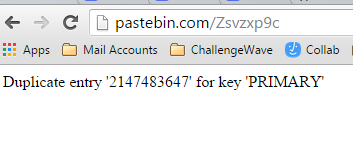
Choosing database column data types can be dicey. Choose an overly large data type, and indexes will be overly large, storage will fill up and other bad things can happen.
Choose an overly small one, and you end up with hard errors.
A common data type for a database identity column is an int. However, if your application gets popular, it can break. Pastebin is a victim of it's own success :)
How to fix a Node.js package error when installing NativeScript
Posted By : Dan Wilson
November 12, 2015 9:26 AM
NativeScript is a free open source offering from Telerik allowing mobile development in Javascript with 100% Access to Native Platform APIs in iOS, Android and Windows Phone. With NativeScript, the entire native platform functionality is available in the JavaScript layer. I've finally found the packaging and tooling I want to use to develop native applications in iOS and Android, while using a single language.
I develop in Windows and I love it for my daily work. However, occasionally, using Node.js on windows is a bit more complicated than on other platforms. While following the very comprehensive Getting started guide for NativeScript, I ran in to a sticky issue. Here is the issue and resolution in case it helps you, my weary web traveler friend.
Firstly, the root cause of the error was my fault. Even though the Getting Started Guide stated I needed to install "The latest Node.js 0.10.x or 0.12.x stable official release", I went off-script and installed Node 4.x. Surely this would work, right?
After spending a fair amount of time struggling with the CLI command to install NativeScript, I re-read the install docs and figured out my Node version was not the right version, so I uninstalled Node.js 4.x and installed Node 0.12.x.
After running the installer again, I still ran into issues. Part of the issue was the C++ compiler not being available. The standard way to get a C++ compiler is to install Visual Studio, though through research, I found Microsoft is offering a standalone C++ compiler specifically to help out with node. This comment by Sara Itani, discusses the new compiler, how it was tested and has the links to download what you need.
I applaud the new and improved Microsoft for their work to support the more modern development platforms like Node.
Once I had the compiler installed, I hit another error. This error was caused because the earlier version of Node.js 4.x left some paths out there that no longer resolved. Once I fixed the paths in the \nodejs\nodevars.bat, and ensured they pointed to the current install of Node 0.12.x, I was able to complete the install. Below is an example of the NativeScript install script output before the error.
2npm WARN excluding symbolic link docs\stylesheets\hightlight.css -> ../../node_m
3odules/highlight.js/src/styles/solarized_light.css
4npm WARN excluding symbolic link docs\assets\ir_black.css -> ../../node_modules/
5highlight.js/src/styles/ir_black.css
6npm WARN excluding symbolic link docs\stylesheets\hightlight.css -> ../../node_m
7odules/highlight.js/src/styles/solarized_light.css
8npm WARN engine xmlbuilder@2.2.1: wanted: {"node":"0.8.x || 0.10.x"} (current: {
9"node":"0.12.7","npm":"2.11.3"})
10|
11
12
13> utf-8-validate@1.0.1 install C:\Users\DanWilson\AppData\Roaming\npm\node_modul
14es\nativescript\node_modules\utf-8-validate
15> node ./build.js
16
17`win32-ia32-v8-3.28` exists; testing
18Binary is fine; exiting
19npm WARN excluding symbolic link examples\TestFramework\Test Framework.framework
20\Resources -> Versions/Current/Resources
21npm WARN excluding symbolic link examples\TestFramework\Test Framework.framework
22\Test Framework -> Versions/Current/Test Framework
23npm WARN excluding symbolic link examples\TestFramework\Test Framework.framework
24\Versions\Current -> A
25npm WARN excluding symbolic link docs\stylesheets\hightlight.css -> ../../node_m
26odules/highlight.js/src/styles/solarized_light.css
27
28
29> bufferutil@1.0.1 install C:\Users\DanWilson\AppData\Roaming\npm\node_modules\n
30ativescript\node_modules\bufferutil
31> node ./build.js
32
33`win32-ia32-v8-3.28` exists; testing
34Binary is fine; exiting
35
36> fibers@1.0.6 install C:\Users\DanWilson\AppData\Roaming\npm\node_modules\nativ
37escript\node_modules\fibers
38> node build.js || nodejs build.js
39
40`win32-ia32-v8-3.28` exists; testing
41Binary is fine; exiting
42-
43
44
45> ref@1.1.3 install C:\Users\DanWilson\AppData\Roaming\npm\node_modules\nativesc
46ript\node_modules\ref
47> node ./build.js
48
49`win32-ia32-v8-3.28` exists; testing
50Binary is fine; exiting
51npm WARN excluding symbolic link docs\assets\ir_black.css -> ../../node_modules/
52highlight.js/src/styles/ir_black.css
53npm WARN excluding symbolic link examples\TestFramework\Test Framework.framework
54\Resources -> Versions/Current/Resources
55npm WARN excluding symbolic link examples\TestFramework\Test Framework.framework
56\Test Framework -> Versions/Current/Test Framework
57npm WARN excluding symbolic link examples\TestFramework\Test Framework.framework
58\Versions\Current -> A
59npm WARN excluding symbolic link docs\stylesheets\hightlight.css -> ../../node_m
60odules/highlight.js/src/styles/solarized_light.css
61npm WARN excluding symbolic link docs\stylesheets\hightlight.css -> ../../node_m
62odules/highlight.js/src/styles/solarized_light.css
63-
64
65
66> ws@0.4.32 install C:\Users\DanWilson\AppData\Roaming\npm\node_modules\nativesc
67ript\node_modules\node-inspector\node_modules\ws
68> (node-gyp rebuild 2> builderror.log) || (exit 0)
69
70if not defined npm_config_node_gyp ( node "%~dp0\..\..\node_modules\node-gyp\bin
71\node-gyp.js" %* ) else ( node %npm_config_node_gyp% %* )
72\
73
74
75> ffi@2.0.0 install C:\Users\DanWilson\AppData\Roaming\npm\node_modules\nativesc
76ript\node_modules\ffi
77> node ./build.js
78
79`win32-ia32-v8-3.28` exists; testing
80Binary is fine; exiting
81npm ERR! Windows_NT 6.1.7601
82npm ERR! argv "C:\\Program Files (x86)\\nodejs\\\\node.exe" "C:\\Program Files (
83x86)\\nodejs\\node_modules\\npm\\bin\\npm-cli.js" "i" "-g" "nativescript"
84npm ERR! node v0.12.7
85npm ERR! npm v2.11.3
86npm ERR! code ELIFECYCLE
87
88npm ERR! ws@0.4.32 install: `(node-gyp rebuild 2> builderror.log) || (exit 0)`
89npm ERR! Exit status 1
90npm ERR!
91npm ERR! Failed at the ws@0.4.32 install script '(node-gyp rebuild 2> builderror
92.log) || (exit 0)'.
93npm ERR! This is most likely a problem with the ws package,
94npm ERR! not with npm itself.
95npm ERR! Tell the author that this fails on your system:
96npm ERR! (node-gyp rebuild 2> builderror.log) || (exit 0)
97npm ERR! You can get their info via:
98npm ERR! npm owner ls ws
99npm ERR! There is likely additional logging output above.
100
101> nativescript@1.4.3 preuninstall C:\Users\DanWilson\AppData\Roaming\npm\node_mo
102dules\nativescript
103> node preuninstall.js
104
105Trying to kill adb server. Some running Android related operations may fail.
106
107npm ERR! Please include the following file with any support request:
108npm ERR! C:\Users\DanWilson\npm-debug.log
What I found annoying about this error, and the reason why I'm posting it here, is because the error points to a failure in the ws package.
2npm ERR! Exit status 1
3npm ERR!
4npm ERR! Failed at the ws@0.4.32 install script '(node-gyp rebuild 2> builderror
5.log) || (exit 0)'.
6npm ERR! This is most likely a problem with the ws package,
7npm ERR! not with npm itself.
8npm ERR! Tell the author that this fails on your system:
9npm ERR! (node-gyp rebuild 2> builderror.log) || (exit 0)
10npm ERR! You can get their info via:
11npm ERR! npm owner ls ws
12npm ERR! There is likely additional logging output above.
However, I could install the WS package separately with no issue.
Good luck and happy developing with NativeScript!
 Suscribe
 Follow Us
 Contact