
 About Dan Wilson
 Contact Me
 Dan Wilson
 Dan Wilson
 Model-Glue:Gesture for Fun and Profit
 Watch Video
 Presentation Files
 DataCurl LLC, My Company
 2010 Speaking Engagements
 Video Interviews
 DZone Articles

Why You Should Register for CFinNC before Sept 4th
 Posted By : Dan Wilson
 August 25, 2009 8:13 AM
As you know, we are hard at work planning the CFinNC.com conference. CFinNC is 2 days of jam packed training and sessions on the Adobe platform (CF, Flash, Flex and AIR) and other web development topics. In this time of evaporating training budgets and non-existent funds for conferences, our free conference is the most compelling way to get trained and fired up.
We've opened registration yesterday and are pleased with the results of the last 24 hours. A big goal of the conference is to reach and strengthen existing users of the Adobe platform by offering all levels of content. We have another goal, which is to reach and impress students and developers of alternate platforms on the power and potency of the Adobe platform.
So to reach the first goal, we've opened registration and are initially promoting through the usual Adobe-centric information channels to reach the existing user base. We want to serve the needs of the Adobe platform users as this was our original driving force to start this conference.
To reach the second goal, we'll begin heavy promotion through user group channels, social channels and through a registration drive partnership with DZone.com. This second wave will likely push us to capacity and give us a large attendee base that will be getting their first exposure to the Adobe platforms.
So, if you are interested in coming, and happen to read this post, please decide and register soon. The floodgates open somewhere around September 4th.
-DW


Free ColdFusion, Flex AIR Conference in North Carolina
Posted By : Dan Wilson
July 21, 2009 1:05 PM
The organizers of the CFinNC 2009 Conference are proud to announce the ColdFusion in North Carolina 2009 Conference to be held October 17-18, 2009 on the Centennial Campus of NC State University in Raleigh, North Carolina. The conference will be aimed at ColdFusion and Flex developers and others who are interested in web design using these technologies.
Registration for the event will be FREE which includes entry to the weekend event and all presentations.
In preparation for this conference, we would like to hear feedback from you and your members on what types of content you would be interested in hearing. We hope to make this conference relative to all levels of developers, so your input will be invaluable.
Please visit our website www.cfinnc.com for more information. We are currently accepting submissions for presentations. If you have a topic you would like to speak on, please go to www.cfinnc.com/page.cfm/presenters for more information.
Please announce this to your members. We are really excited at the opportunity to organize this conference and hope that it will be a useful resource for you and your members.
Sincerely,
The CFinNC 2009 team
I Flunked the AIR Practice Exam
Posted By : Dan Wilson
March 29, 2009 11:51 PM
I'm going to soon be AIR 1.5 certified, though it is going to take a little longer than I thought. I took the free AIR based mock exam and scored 58%.
Definitely nothing to be proud of, yeah? The good news is the practice exam pointed out a few areas of study for me to focus on and I'll have it all nailed down shortly.
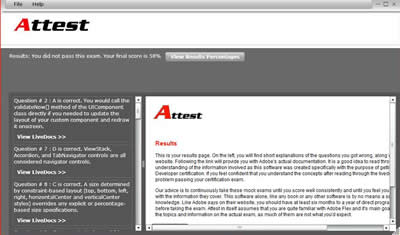
So I have a little more work to do, but I'll be AIR Certified soon! See how well you'd score!
CFObjective Session: Build a ColdFusion powered AIR application
Posted By : Dan Wilson
March 24, 2009 9:56 PM
I'm putting the finishing touches on my upcoming presentation, Build a ColdFusion powered AIR application, for CF.Objective() and wanted to pass on some interesting news.
A couple of weeks ago, Terry Ryan, invited me to expand my presentation to cover AIR+ColdFusion functionality to be released in CF 9 Centaur. I'm totally thrilled to present a few CF9 features and am busy redoing the presentation so we can all get a better look at what CF9 brings to Rich Internet Applications. The illustrious Dan 'Big Pipes' Vega was also tapped to present some CF9 content at CF.Objective() so I'm pretty interested to see what he's going to show.
The upcoming CF9 brings many game-changing features to the table and adds a lot to the ColdFusion+RIA equasion. CF.objective() 09 is turning out to be the first public discussion on CF9 Centaur features and you don't want to miss these sessions, do you?
What? You've not registered for CF.Objective() yet? You can still take advantage of historically low airfare and the extended Early Bird Special, just do it before March 31st, ok? Check the sessions if you still need more convincing!
I present You Got Your ColdFusion In My Adobe Air! to TACFUG March 18th
Posted By : Dan Wilson
March 17, 2009 7:48 PM
You Got Your ColdFusion In My Adobe Air!
Meeting: 3/19/09 6:00 PM SRA International
Come see how to use ColdFusion to power an Adobe AIR desktop application.
Adobe AIR is quickly gaining momentum as a pioneer of the Rich Desktop. ColdFusion is a rapid development platform providing rich services and timely functionality for business applications.
When the two come together, it is the greatest combination since Reeses Peanut Butter Cups...

Last Day Of Stockholm AIR Browser War Competition
Posted By : Dan Wilson
June 24, 2008 10:48 AM
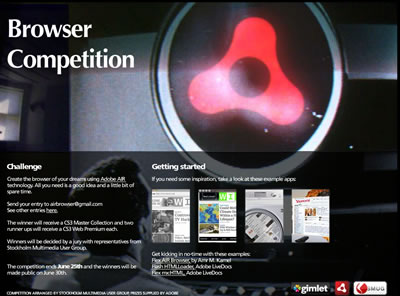
Today is the last day of the Stockholm AIR Browser War competition. Put on by the Stockholm Multimedia User Group, entrants create cool browsers using Adobe AIR technology and compete to win some cool Adobe software like CS3 Master Collection and CS3 Web Collection.
As I said, the last day to enter is June 25th. Get your submissions in!
Listen to 7 CF geeks talk about Flex and AIR
Posted By : Dan Wilson
March 12, 2008 5:36 PM
The first installment of the ColdFusion Round Table was released today. A ColdFusion Round Table is a collection of Motley ColdFusion geeks talking about the relevant issues of the day. I was a participant along with Sean Corfield, Peter J. Farrell, Brian Meloche, Terrence Ryan, Brian Swartzfager, Matt Woodward. This round table focused mostly on the recent release of Flex and AIR and we covered quite a bit in an hour and fifteen minutes.
Being on a podcast is pretty cool. Matt and Peter made it very comfortable and easy for us all to participate. Once I got over the "Do I really sound like that in real life?" bit, I felt fine.
I'm pretty amped on Flex and AIR. Really, platforms like this will drive the next wave of application development. Web applications that remain HTML+CSS based will begin to look more dated in the next few years and there will be much resources and energy expended to upfit applications with the latest in features and branding. As I mentioned, this is a very exciting time to be an application developer and now, more than previous, it is important to update your skills. There are no hungry Flex developers right now :).
Anyways, the finished podcast product turned out rather well. Give it a listen and tell me what you think.
Meet The Man Who Set Twitter Free Of The Browser
Posted By : Dan Wilson
March 7, 2008 10:32 AM
I interviewed Aaron West for DZone.com recently. Aaron is a long time ColdFusion, Flash and Flex developer. Aaron is the author of twitterAIR, the first Twitter/RIA integration based on the Adobe Integrated Runtime platform and he has a host of community contributions and accolades to his credit. In this interview, we get to know Aaron, find out how and why he built twitterAIR and hear his thoughts on the direction of Rich Internet Applications.
Give it a read at the RIA Zone
On CSS, HTML and Boiling Frogs
Posted By : Dan Wilson
February 22, 2008 8:13 AM
I've just released an article at the RIA Zone titled CSS3: A solution for applications, or are we the boiling frogs?. The article is about CSS and HTML for applications and begins like this:
I've made countless web pages using HTML + CSS and have no complaints about the technological combination for Internet documents and pages. The rub comes when trying to make an application. Note the distinguishing factors. HTML + CSS is a horrid combination for making applications.
To be true, the HTML + CSS isn't truly the problem, the problem lies in inconsistent rendering by the clients (browsers). However, a large part of my job is making sure an application works, not debating with users which browser renders 'correctly'.
When building an HTML + CSS based application, there will be some unanticipated time required to track down and hack around a strange edge case or rendering bug . The time spent to track down the source of the error, which by the way only happens in IE version 6.0.23234234 and in Firefox 2.098435 and not Firefox 2.102309, is lost time. I've even spent 8 or 9 hours tracking down the source of a CSS related problem, googling around, reading blogs to find a solution and then testing all the various browsers using various user interaction permutations to verify the fix didn't break another client implementation. While spending this time was necessary for the success of the application, I would have preferred to spend that time towards building another useful feature for the users.
The article is a lot longer. Give it a read and let me know if I am off base.
Give your take on "Why Flex?" at 360|Flex
Posted By : Dan Wilson
February 21, 2008 7:02 PM
Thanks to Adobe and Ben Forta, I am the proud owner of a fancy Flip video camera. I've been tasked with recording 10 segments from the community answering the questions:

- Why Flex?
- Why ColdFusion?
- Why AIR?
- Why Flash?
Since I'll be at 360|Flex next week, finding 10 people to share will be easy. Come on over and let's hear your answers to these questions. Support your favorite platform!
360|Flex, be there or be square!
 Suscribe
 Follow Us
 Contact