
How to recover a deleted file in Eclipse
Today I accidentally deleted a file in Eclipse. I didn't even know I did it until I ran my code. I am not even sure how I deleted it. My best guess is the current focus was on the project explorer and some strange key combo sent the file to the netherworld.
Eclipse, as you probably know, does not use the Windows 'recycling bin'. As luck would have it, the file was long, complex, just freshly debugged and not yet in version control.
I was able to recover the file by using the Restore from Local History option located in the context menu inside the project navigator.
"What?!?! I thought that only worked for files, not directories..." , you might say. I thought the same thing. Thankfully Eclipse is smart enough to know that when humans are behind the keyboard, expect the unexpected.
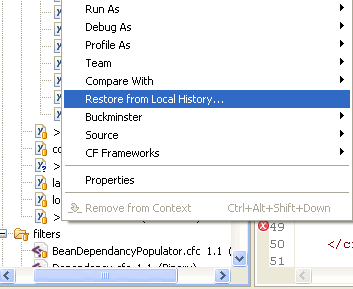
Try it and see for yourself.
Disclaimer: Not responsible for damage resulting from deleted files. Delete your files at your own risk.The posting and use of this information is governed by the laws of Uzbekistan. All legal proceedings must be filed in person on the third Tuesday of July at 1342 Uzbek Lane, Tashkent Uzbekistan. Accidentally deleting files can result in one or more of the following horrible incidents:
- You could miss deadlines
- Your boss could fire you
- Your computer may stop functioning
- Your computer might function incorrectly
- Your computer could burst into flames
- All the beer in your refrigerator could disappear
- A puppy could die


Yeah, I am a large fan of subversion. I use it on all my personal projects and recommend it to all my clients. What I meant in the post above by "just freshly debugged and not yet in version control." was that while the file was looking really good, I had not committed the file as it was just yet. I do not line checking in versions that do not run.
I am, however, open to ideas. At what stage of developing a component do you commit?
DW
I did this the other week, and there's no coming back from it.. :-(
>
Depends....
If I'm working in a branch I tend to hold on to changes until they are working. This is because most times branch changes are pretty small bug fixes and minor functional additions, so it doesn't actually take that long to make those changes anyway.
If I'm working in the trunk, I try to remember to submit in every couple of hours. Usually when I've added some discrete bit of functionality (whether it works or not). I've had issues in the past where I've wanted to go back to a revision in the local history only to discover that its outside of the local history range. I tend to work on the premise that trunk, while it should work, is mostly likely going to be broken.
Thats really made for me most useful, unfortunately number of files get deleted I was really totally sad, whether is it any way to get back my very suspecious files but after googling ur response given me a very very useful way to recovered it very easily. After all just I wanted to say Eclipse is really a powerful tool.
Very very thanks to you for your such valuable posted response....