
 About Dan Wilson
 Dan Wilson
 Dan Wilson
 Model-Glue:Gesture for Fun and Profit
 Watch Video
 Presentation Files
 DataCurl LLC, My Company
 2010 Speaking Engagements
 Video Interviews
 DZone Articles

Secret 1337 Trick - Undo Close Tab in Firefox
 Posted By : Dan Wilson
 June 6, 2007 8:44 AM
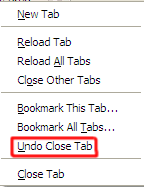
I just found an interesting feature in Firefox 2. If you have an open tab, then close it, you can right-click the tabs and choose 'Undo Close Tab' and the banished tab will return.
Update:
Jim Priest, who turned me on to the Microsoft Update Reboot Fix points out that the following key combos work:
CTRL+T = new tab
CTRL+SHIFT+T = restore last closed tab
I've use CTRL+T countless times. It never dawned on me to try CTRL+SHIFT+T. Thanks again Jim!


There are no comments for this entry.
 Add Comment
 Subscribe to Comments
7/17/08 4:54 AM
# Posted By Stefan
Uh - I meant Ctrl-Shift-T
9/30/08 12:40 PM
# Posted By Logan
Thanks dan you saved me on my homework
 Suscribe
 Follow Us
 Contact
Ctrl-Shift-Tab does not work with Firefox 3.0.
Can anyone confirm this or is it just my installation?